ランタイム画像圧縮
-
2024年10月23日

はじめに
皆様こんにちは。
クライエントエンジニアのKと申します。
ココネのサービスでは、ユーザーが画像を保存したり、他のユーザーと共有したりできる機能を提供しています。しかし、特にモバイル端末では、ユーザーが提供した大量の画像を読み込むと、メモリに負荷がかかることがあります。そのため、今回はいくつかの方法を調査し、Unityで比較しました。
問題
Unityでは、画像をPNG形式で保存し、サーバーにアップロードする方法をよく使用しますが、この方法では非圧縮のテクスチャになってしまいます。
// 保存
RenderTexture.active = rt;
Texture2D tex = new Texture2D(rt.width, rt.height, TextureFormat.RGB24, false);
tex.ReadPixels(new Rect(0, 0, rt.width, rt.height), 0, 0);
RenderTexture.active = null;
byte[] bytes = tex.EncodeToPNG();

// ロード
Texture2D tex2 = new Texture2D(2, 2);
ImageConversion.LoadImage(tex2, bytes, markNonReadable: true);

たとえば、サイズ1080×1920の写真には5.9MBがあります。
それを解決するための2つの方法があります。1つはサイズ変更、もう1つは圧縮です。ここでは圧縮について話します。
圧縮
ETC2とASTCは、モバイルプラットフォームで最も一般的な圧縮フォーマットです。
圧縮されたデータをロードするには、Texture2D.LoadRawTextureDataを使用します。
var tex = new Texture2D(width, height, TextureFormat.ETC2_RGBA8);
tex.LoadRawTextureData(bytes);
tex.Apply(updateMipmaps: false, makeNoLongerReadable: true);
ETC2
Unity
Unity Editorでは、複数のETCコンプレッサーを提供しています。
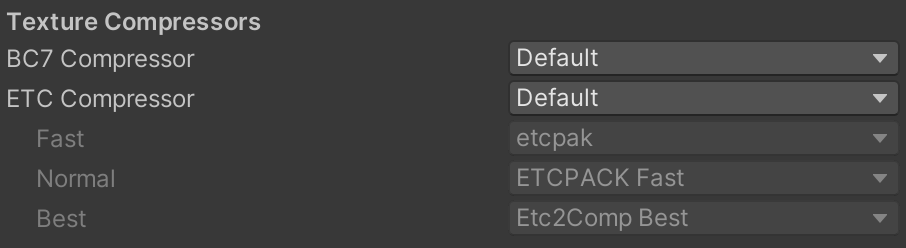
そして、Unity 2021.1以降、Texture2D.CompressでランタイムETCの圧縮を提供します。
On Android, iOS and tvOS, this will compress the texture to the ETC/EAC family of formats.
使用方法は非常に簡単です。非コンパスリーズテクスチャでTexture2D.Compressを呼び出すだけです。Unityスタッフからの返信によると、内部にetcpakを使用しています。
etcpakは最も高速な圧縮ツールとされています。バージョン1.0以降では、「QuickETC2: Fast ETC2 texture compression using Luma differences」という論文で提案された手法を採用しています。
さらに興味深い点は、この著者がETC圧縮に焦点を当てており、最近2つの論文を提出したことです。
– H-ETC2: Design of a CPU-GPU Hybrid ETC2 Encoder
– QuickETC2-HQ: Improved ETC2 encoding techniques for real-time, high-quality texture compression
CPUとGPUの両方を使用するハイブリッドの方法を提供します。興味があれば 見てください。
Unreal
Unreal 4.26以降には、Compute Shaderを使用して実行時のETC圧縮を行う「ETCCompressionCommon.ush」というファイルがあります。
Unityで使用するには、C#とCompute Shaderを作成する必要があります。
– C#
var cs = Resources.Load<ComputeShader>("ETCCompress");

if (texture.format == TextureFormat.RGBA32) cs.EnableKeyword("HAS_ALPHA");
else cs.DisableKeyword("HAS_ALPHA");

var kernelHandle = cs.FindKernel("CSMain");

using var outBuffer = new GraphicsBuffer(GraphicsBuffer.Target.Structured,
    (texture.width / 4) * (texture.height / 4),
    sizeof(uint) * (texture.format == TextureFormat.RGBA32 ? 4 : 2));

cs.SetBuffer(kernelHandle, ResultID, outBuffer);
cs.SetTexture(kernelHandle, RenderTexture0ID, texture);
cs.SetInts(DestRectID, new int[4] { texture.width / 4, texture.height / 4, texture.width, texture.height });
cs.Dispatch(kernelHandle, (texture.width / 4 + 7) / 8, (texture.height / 4 + 7) / 8, 1);

var bytes = new byte[outBuffer.count * outBuffer.stride];
outBuffer.GetData(bytes); // AsyncGPUReadbackの使用をお勧めします
– Compute Shader
#include "ETCCompressionCommon.hlsl"
#include "BlockCompressionCommon.hlsl"

#pragma multi_compile_local __ HAS_ALPHA

#pragma kernel CSMain

#if HAS_ALPHA
RWStructuredBuffer<uint4> Result;
#else
RWStructuredBuffer<uint2> Result;
#endif
Texture2D<float4> RenderTexture0;
SamplerState samplerRenderTexture0;
uint4 DestRect;

[numthreads(8, 8, 1)]
void CSMain(uint3 ThreadId : SV_DispatchThreadID)
{
    uint2 SamplePos = ThreadId.xy * 4;
    if (any(SamplePos >= DestRect.zw))
        return;

    float2 TexelUVSize = 1.f / float2(DestRect.zw);
    float2 SampleUV = (float2(SamplePos) + 0.5f) * TexelUVSize;

    float3 BlockBaseColor[16];
    ReadBlockRGB(RenderTexture0, samplerRenderTexture0, SampleUV, TexelUVSize, BlockBaseColor);

    uint blockID = ThreadId.y * DestRect.x + ThreadId.x;

#if HAS_ALPHA
    float BlockA[16];
    ReadBlockAlpha(RenderTexture0, samplerRenderTexture0, SampleUV, TexelUVSize, BlockA);
    Result[blockID] = CompressBlock_ETC2_RGBA(BlockBaseColor, BlockA);
#else
    Result[blockID] = CompressBlock_ETC2_RGB(BlockBaseColor);
#endif
}
元のスクリプトはRWTexture2Dを使用していますが、一部の端末で問題が発生したため、RWStructuredBufferを使用します。
Betsy
Godotで使用されるテクスチャ コンプレッサーで、複数のフォーマットをサポートしており、GLSLを使用しています。Unityに移植する時間がなかったため、今回はテストしていません。
ASTC
ARM
最も有名なASTCコンプレッサーで、多くのカスタマイズをサポートしています。
Unityで使用するにはネイティブプラグインを作成する必要があります。
– Android
公式サイトではAndroid版が提供されていないため、自分でコンパイルする必要があります。
export NDK_PATH=/Applications/Unity/Hub/Editor/2022.3.30f1/PlaybackEngines/AndroidPlayer/NDK
# armeabi-v7aとarm64-v8aの両方をコンパイルする必要があります
cmake .. \
  -DCMAKE_TOOLCHAIN_FILE=$NDK_PATH/build/cmake/android.toolchain.cmake \
  -DANDROID_ABI=arm64-v8a \
  -DANDROID_PLATFORM=android-21 \
  -DCMAKE_BUILD_TYPE=Release \
  -DCMAKE_INSTALL_PREFIX=../install_android \
  -DASTCENC_SHAREDLIB=ON \
  -DASTCENC_CLI=OFF
C#で必要な構造体を定義し、関数をインポートします。
#if UNITY_IOS && !UNITY_EDITOR
    [DllImport("__Internal")]
#else
    [DllImport("libastcenc-shared")]
#endif
    public static extern astcenc_error astcenc_config_init(
        astcenc_profile profile,
        uint block_x,
        uint block_y,
        uint block_z,
        float quality,
        uint flags,
        ref astcenc_config config
    );

#if UNITY_IOS && !UNITY_EDITOR
    [DllImport("__Internal")]
#else
    [DllImport("libastcenc-shared")]
#endif
    public static extern astcenc_error astcenc_context_alloc(
        ref astcenc_config config,
        uint thread_count,
        out IntPtr context
    );

#if UNITY_IOS && !UNITY_EDITOR
    [DllImport("__Internal")]
#else
    [DllImport("libastcenc-shared")]
#endif
    public static extern astcenc_error astcenc_compress_image(
        IntPtr context,
        ref astcenc_image image,
        ref astcenc_swizzle swizzle,
        IntPtr data_out,
        ulong data_len,
        uint thread_index
    );

#if UNITY_IOS && !UNITY_EDITOR
    [DllImport("__Internal")]
#else
    [DllImport("libastcenc-shared")]
#endif
    public static extern void astcenc_context_free(IntPtr context);
– iOS
iOSでは静的リンクを使用する必要がありますが、Unity にはすでにArm ASTC Encoderの一部が組み込まれており、実行時にメモリ アクセス エラーが発生するようです。
これを解決するには、ソースコードを調整して名前空間を追加します。そして、C#へのラッパーを提供します。
#include <cstddef>
#include <cstdint>
#include "astcenc.h"

#ifdef __cplusplus
extern "C"
{
#endif

	ASTCENC_PUBLIC Cocone::astcenc_error astcenc_config_init(
		Cocone::astcenc_profile profile,
		unsigned int block_x,
		unsigned int block_y,
		unsigned int block_z,
		float quality,
		unsigned int flags,
		Cocone::astcenc_config *config)
	{
		return Cocone::astcenc_config_init(profile, block_x, block_y, block_z, quality, flags, config);
	}

	ASTCENC_PUBLIC Cocone::astcenc_error astcenc_context_alloc(
		const Cocone::astcenc_config *config,
		unsigned int thread_count,
		Cocone::astcenc_context **context)
	{
		return Cocone::astcenc_context_alloc(config, thread_count, context);
	}

	ASTCENC_PUBLIC Cocone::astcenc_error astcenc_compress_image(
		Cocone::astcenc_context *context,
		Cocone::astcenc_image *image,
		const Cocone::astcenc_swizzle *swizzle,
		uint8_t *data_out,
		size_t data_len,
		unsigned int thread_index)
	{
		return Cocone::astcenc_compress_image(context, image, swizzle, data_out, data_len, thread_index);
	}

	ASTCENC_PUBLIC void astcenc_context_free(
		Cocone::astcenc_context *context)
	{
		return Cocone::astcenc_context_free(context);
	}

#ifdef __cplusplus
}
#endif
astc_encoder
real time ASTC texture compression by computer shader
これはこの記事で見た方法です。
Qiita ランタイムでTexture2DをASTCテクスチャに圧縮しロードする
ASTC圧縮を行うためにCompute Shaderを使用しており、処理を高速化するために、影響の大きい検索のみを実行します。詳細については、https://niepp.github.io/2021/12/18/Compute-ASTC.html (中国語) を参照してください。4×4と6×6のブロックサイズのみサポートします。
– C#
int DimSize = blockWidth == BlockWidth._4x4 ? 4 : 6;
int TexWidth = texture.width;
int TexHeight = texture.height;
int xBlockNum = (TexWidth + DimSize - 1) / DimSize;
int yBlockNum = (TexHeight + DimSize - 1) / DimSize;
int TotalBlockNum = xBlockNum * yBlockNum;

int GroupSize = THREAD_NUM_X * THREAD_NUM_Y;
int GroupNum = (TotalBlockNum + GroupSize - 1) / GroupSize;
int GroupNumX = (TexWidth + DimSize - 1) / DimSize;
int GroupNumY = (GroupNum + GroupNumX - 1) / GroupNumX;

using var constData = new GraphicsBuffer(GraphicsBuffer.Target.Constant, 1, sizeof(uint) * 4);
using var outBuffer = new GraphicsBuffer(GraphicsBuffer.Target.Structured, TotalBlockNum, BLOCK_BYTES);

var cs = Resources.Load<ComputeShader>("ASTC_Encode");

if (blockWidth == BlockWidth._6x6) cs.EnableKeyword("BLOCK_6X6");
else cs.DisableKeyword("BLOCK_6X6");

if (texture.format == TextureFormat.RGBA32) cs.EnableKeyword("HAS_ALPHA");
else cs.DisableKeyword("HAS_ALPHA");

constData.SetData(new CSConstantBuffer[] { new CSConstantBuffer((uint)TexWidth, (uint)TexHeight, (uint)GroupNumX, (uint)TotalBlockNum) });
cs.SetConstantBuffer(constDataID, constData, 0, constData.stride * constData.count);
cs.SetTexture(0, inTextureID, texture);
cs.SetBuffer(0, outBufferID, outBuffer);
cs.Dispatch(0, GroupNumX, GroupNumY, 1);

var bytes = new byte[TotalBlockNum * BLOCK_BYTES];
outBuffer.GetData(bytes);  // AsyncGPUReadbackの使用をお勧めします
– Compute Shader
#pragma multi_compile_local __ BLOCK_6X6
#pragma multi_compile_local __ HAS_ALPHA

#pragma kernel MainCS
#include "ASTC_Encode.hlsl"
Androidでは次の警告が表示される場合があります。これを解決するには、大きなconstの代わりに StructuredBufferを使用します。
HLSLcc: Large chunk of constant data detected. GLSL and Vulkan might have trouble handling this.
Please consider putting large constant data arrays into a separate buffer resource instead. at kernel MainCS
– Compute Shader
#if defined(SHADER_API_VULKAN) || defined(SHADER_API_GLES3)
StructuredBuffer<int> scramble_table;
#else
static const int scramble_table[12 * 32] = { ... }
#endif
– C#
if (SystemInfo.graphicsDeviceType == GraphicsDeviceType.Vulkan || SystemInfo.graphicsDeviceType == GraphicsDeviceType.OpenGLES3)
{
    scrambleTableBuffer = new GraphicsBuffer(GraphicsBuffer.Target.Structured, scramble_table.Length, sizeof(int));
    scrambleTableBuffer.SetData(scramble_table);
    cs.SetBuffer(0, "scramble_table", scrambleTableBuffer);
}
実験
実験方法
モバイルプラットフォームでどちらが優れているかを判断するために、次の方法をテストします。
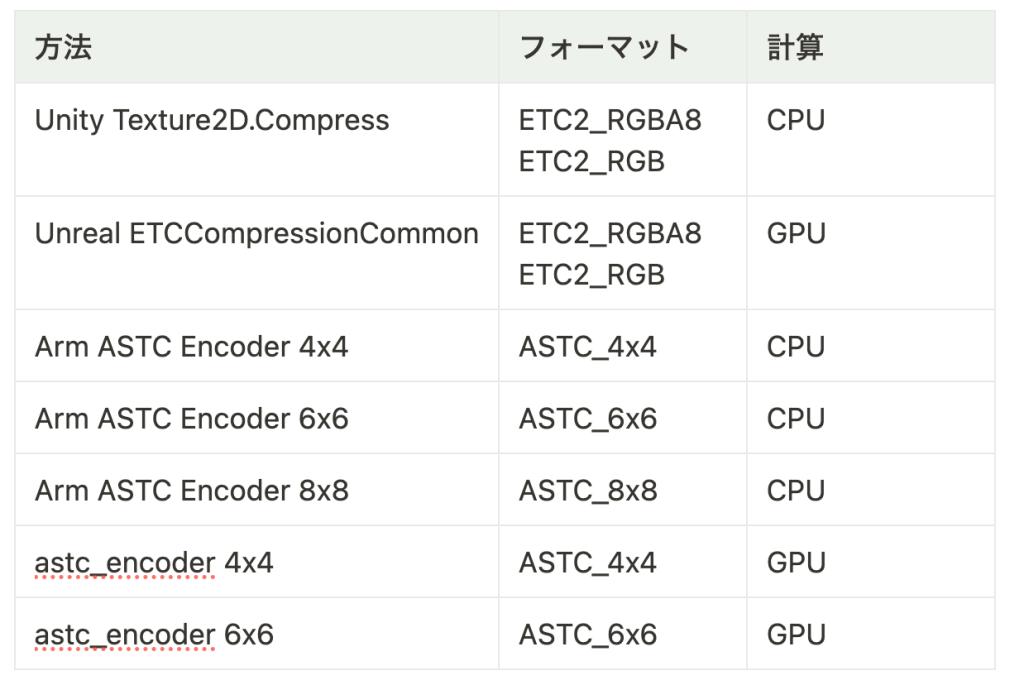
Arm ASTC Encoderでは最高速モードを使用します。
RGBAとRGBテクスチャの両方でテストします。各サイズは1080×1920です。
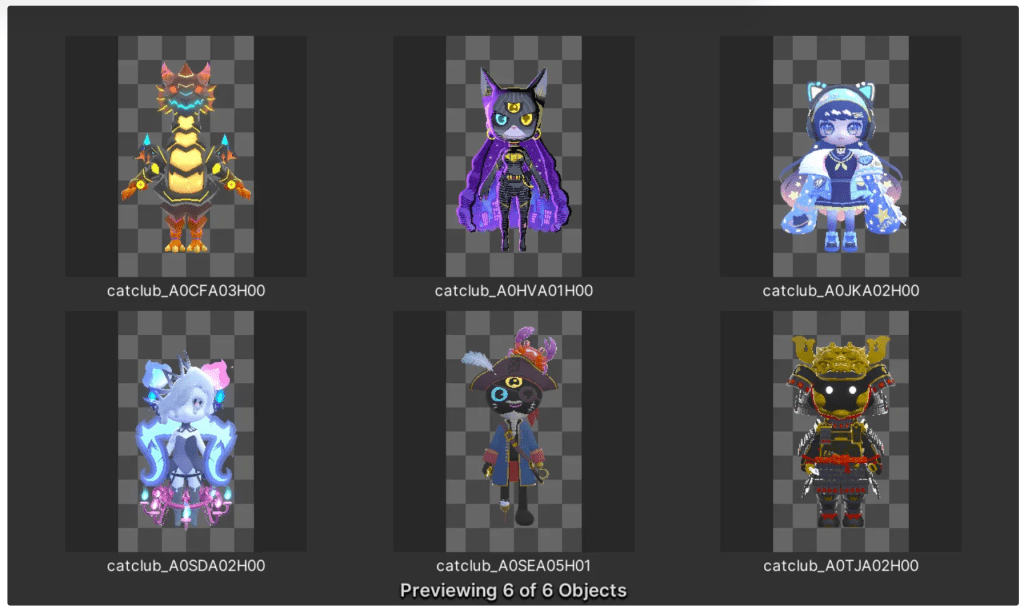
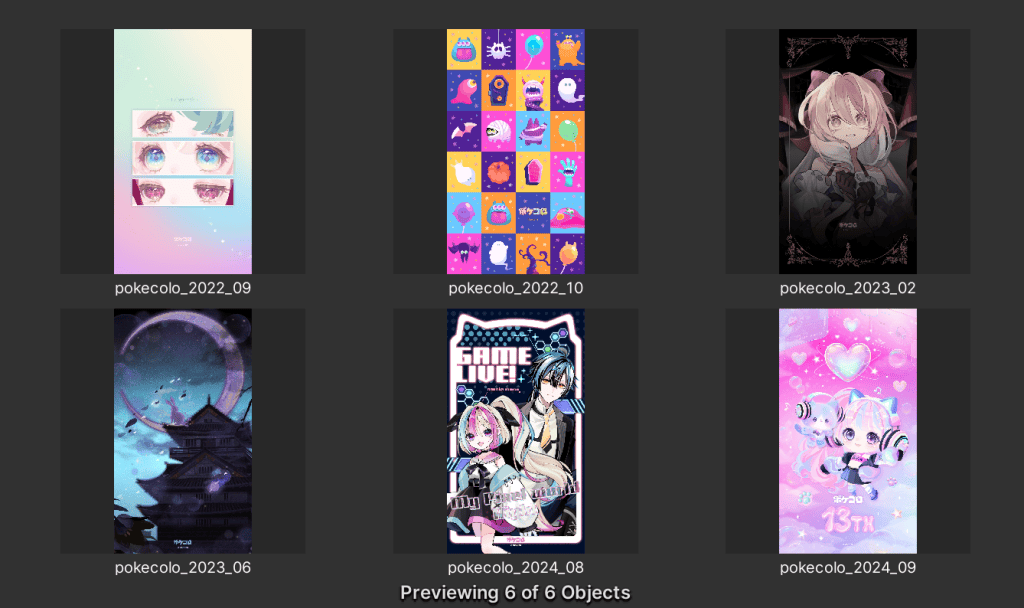
そしてサイズ、実行時間、画質評価を測定します。画像評価には最も一般的な方法を使用します。
- SSIM (Structural similarity index measure)
- 0 ~ 1 (高いほど良い)
- PSNR (Peak signal-to-noise ratio)
- 0 ~ 100 dB (高いほど良い)
各テクスチャは 3 回実行され、実行時間を平均します。
入力は Texture2D で、出力はバイトです。
実験環境
Unity 2022.3.30f1

結果
サイズ
・RGBA32:7.9 MB
・RGB24:5.9 MB
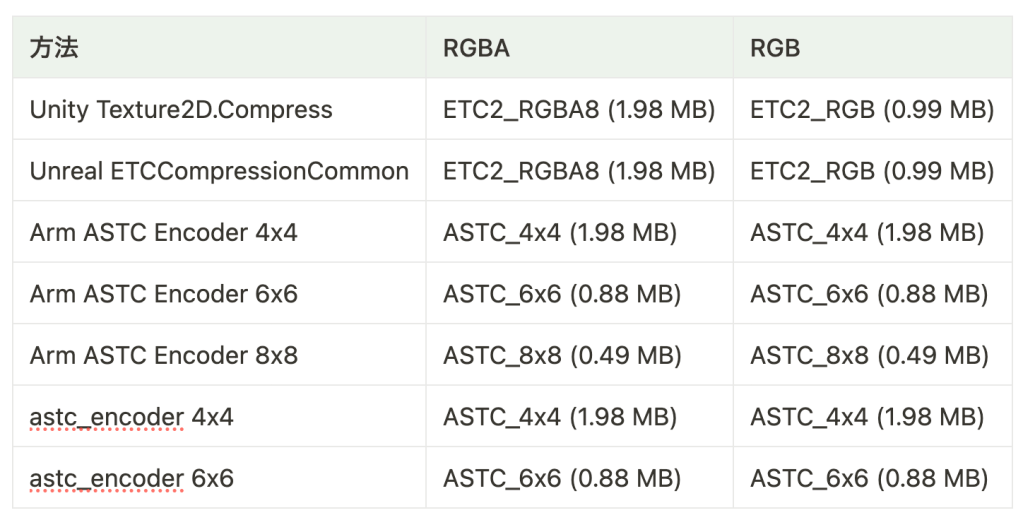
・RGBAの場合、ブロックが少なくとも6×6の場合、ASTCテクスチャは小さくなります。
・RGBの場合、ブロックが6×6より大きいとASTCテクスチャは小さくなります。
実行時間

- Compute ShaderのパフォーマンスはAndroidではそれほど良くなく、問題を引き起こす可能性があります。
- astc_encoderでは、Nokia 8の実行時にクラッシュしました。端末によっては、コンピュート シェーダーが十分にサポートされていない可能性があります。
- Arm ASTC Encoderは非常に遅いので、サービスで使用するのは難しいかもしれません。
- 実験ではGraphicsBuffer.GetDataを使用してデータを取得しますが、実際のサービスではメインスレッドをブロックしないようにAsyncGPUReadbackを使用することをお勧めします。
画面評価
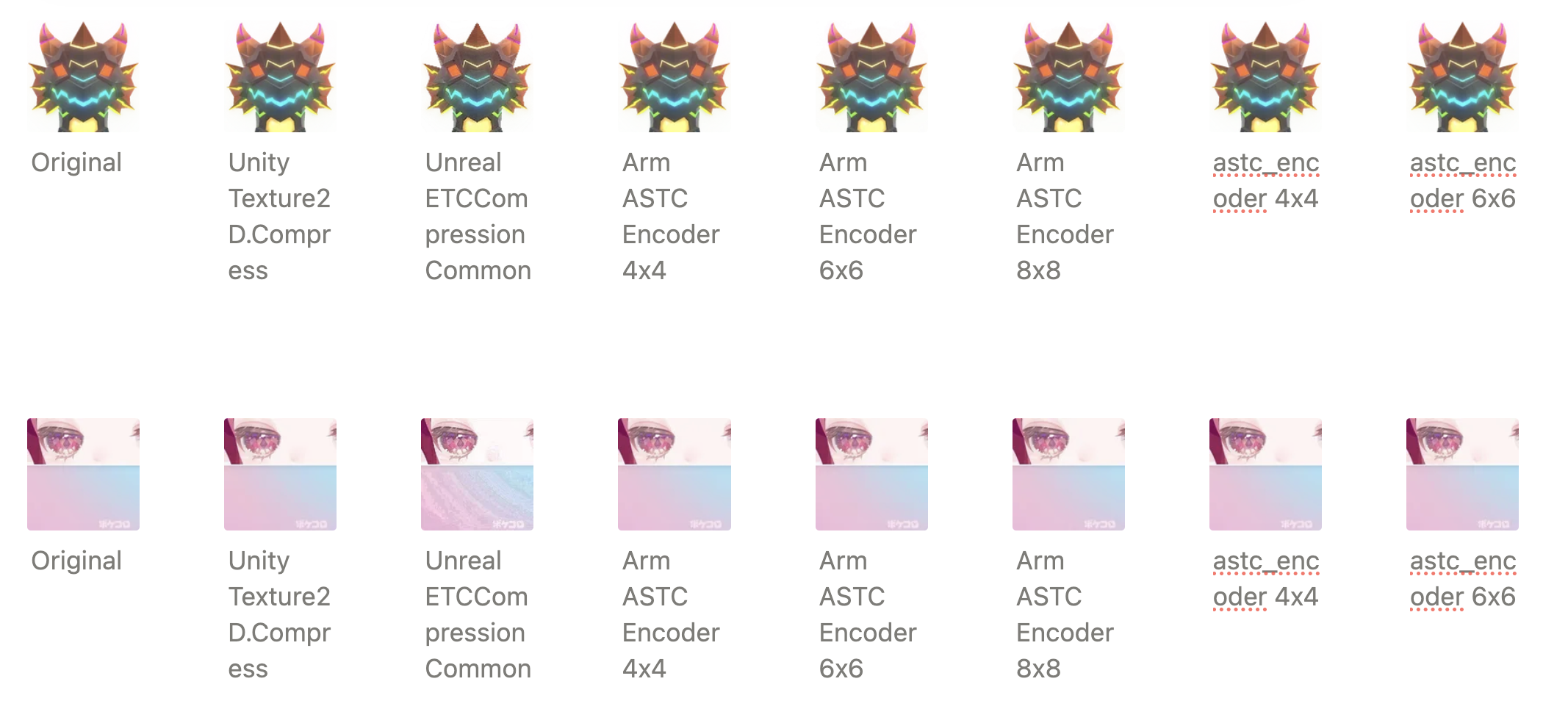
SSIM

UnrealのETCCompressionCommonを除いて、すべて品質が良いです。
PSNR
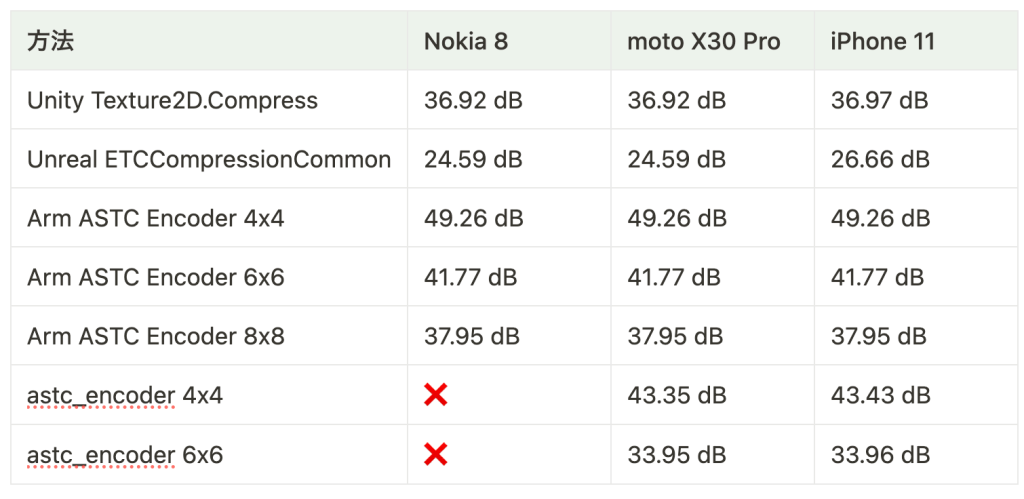
30 dB を超えていれば品質は許容範囲内になります。
- UnrealのETCCompressionCommonを除いて、すべて品質が良いです。
- Arm ASTC Encoderは最高の品質を提供します。
結論
- UnrealのETCCompressionCommonの圧縮画像の品質が低いです。
- Arm ASTC Encoderは最高の品質と最小のサイズを提供しますが、速度が遅いです。
- astc_encoderはiOSでは良好に動作しますが、Androidでは問題が発生することがあります。
UnityのTexture2D.Compressは、サイズや速度において最適ではありませんが、すべての端末で対応しており、品質も許容範囲内です。現時点では、それが最適な選択肢かもしれません。
ただし、Texture2D.CompressはUnityメイン スレッド上で実行する必要がありますが、GPUベースの方法では非同期で待機でき、Arm ASTC Encoderでも他のスレッドで実行できます。さらに、BetsyやApple Image I/Oフレームワークなど、まだテストされていない方法もあります。
現時点ではTexture2D.Compressを選択するかもしれませんが、将来的にはさらに優れた方法が出てくるかもしれません。
参考
- https://github.com/wolfpld/etcpak
- https://github.com/darksylinc/betsy
- https://zhuanlan.zhihu.com/p/327045410
- https://github.com/ARM-software/astc-encoder
- https://github.com/niepp/astc_encoder
- https://qiita.com/up-hash/items/76f6f879f3129bb1d23e
- https://niepp.github.io/2021/12/18/Compute-ASTC.html
- ChatGPT
ENSAPIA Engineeringでは一緒に働く仲間を募集中です。
ご興味のある方は、ぜひこちらのエンジニア採用サイトをご覧ください。
→ENSAPIA Engineering 株式会社エンジニアの求人一覧